Plain-English AI from a real person.
Practical AI from 31 years in IT · Issue 02 · Week of October 25, 2026
Welcome back. This week: an FBI election-scam warning, a new AI assistant that comes to you, Gemini in the car and help for small business owners.
On October 15, the FBI warned that scammers are using the 2026 midterm election to cheat people and steal personal information. They ask you to give to fake campaigns, sell political merchandise that never ships or text you that you aren't registered to vote, with a link to a fake sign-up page. The FBI says scammers also use AI to make realistic voices, pictures and messages that pretend to be candidates, campaigns, government offices and people you trust.
Why it matters to you: A campaign contribution is a gift, not a deal. Nothing comes back to you. Check your registration yourself at vote.gov. To give, type the campaign's web address yourself. Election Day is November 3, so expect more of these. Report scams to the FBI at ic3.gov.
Source: FBI election-scam alert (October 15, 2026)
On October 21, Anthropic opened an early test of Claude Duet. (Claude is Anthropic's AI assistant, a rival to ChatGPT.) Most chatbots wait for you to type. Duet goes first. Each morning it sends a short brief on what matters in apps you've connected, such as Gmail, and during the day it messages you when something needs you. It can also take on tasks, like scheduling a meeting, while your phone is off. Anthropic says it shows you what it's about to do and waits for your OK before it sends a message, makes a payment, signs a document or deletes anything. As of October 23, it's U.S.-only, for paid Pro and Max subscribers, with a waitlist.
Why it matters to you: that makes three big personal agents (AI helpers that act for you): Meta's Muse, OpenAI's Dots and now Duet. Anthropic admits this early version "might misread a thread or miscalibrate what's urgent." An approval step only protects you if you actually read it. Start with one or two apps.
Sources: Anthropic (October 21, 2026); Claude Help Center
On October 20, Google said Gemini (Google's AI assistant) is now available worldwide on Android Auto (the system that puts your phone's apps on your car's screen) and in cars with Google software built into the dashboard. An optional feature called Personal Intelligence lets Gemini use your Gmail, Calendar, Photos and Maps to answer questions like "What's my flight gate? And is my flight on time?" As of October 23, it's rolling out on Android Auto for personal Google accounts, ages 18 and up. Cars with Google built in come in the next few months. It stays off until you turn it on, and you choose which apps it uses.
Why it matters to you: spoken answers beat glancing at your phone at a red light. If Gemini reads your email or calendar aloud, your passengers hear it too. Connect only what you'd be comfortable sharing. You can turn it off anytime in Gemini's settings.
Source: Google (October 20, 2026)
On October 20, Google added small business tools to the Gemini app: it can remember your logo and colors for flyers and social posts, and it can turn messy receipts and spreadsheets into charts. Google says the tools reach all Gemini app users worldwide "in the coming days," so as of October 23 you may not see them yet.
Why it matters to you: sorting receipts is the kind of dull work AI does well, but check its totals against your own books. Never upload customers' card or Social Security numbers.
Source: Google (October 20, 2026)
Story 1 is a reminder that scam messages keep getting harder to spot. An AI chatbot can be a second set of eyes:
Tip: tap or click inside the box to select it, then copy.
AI is good at spotting the usual tricks: pressure, threats, secrecy and strange requests. It can't know for sure whether a message is real. Treat its answer as a second opinion, not a verdict.
As of October 24, each of these has a free tier with usage limits:
“Agentic” AI is AI that carries out a multi-step job for you instead of just answering. The free one I can point to today is Work mode in the ChatGPT desktop app for Windows and Mac, with limited use. Most other agents still need a paid plan.
If you’d rather not commit to one company, one option I’ve been looking at is PPQ (ppq.ai). You pay per question with no subscription and switch among hundreds of models from OpenAI, Anthropic, Google, xAI and others. As with any AI service, keep private details out of your questions. For a clear walkthrough, Sovereign Sessions has a good video tutorial (about 30 minutes) on how PPQ works.
Try the free tiers first and pay only when you know what you need.
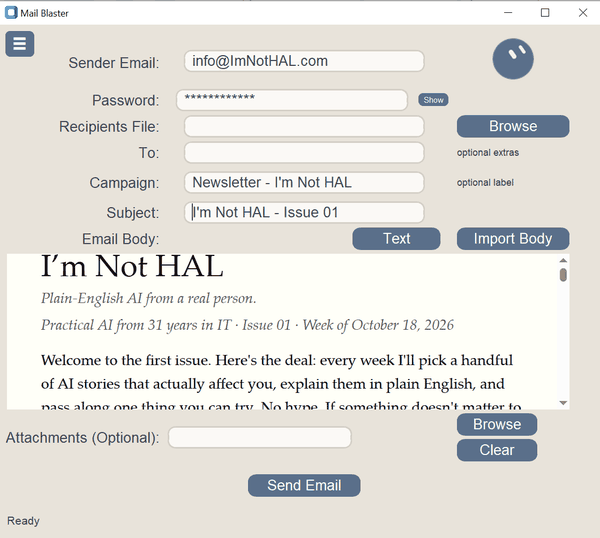
In 31 years in IT I built plenty of desktop apps. Now I code as a hobby. A while back I wrote Email-Blaster, a small app that sends email to a list, for my son-in-law, who ran a youth soccer league.
I built a rough working version myself, then handed it to Grok Build, an AI coding assistant. It added features, wrote tests and ran them. When I decided to send this newsletter with my own app (programmers call that "eating your own dog food"), Grok Build also built a helper that welcomes new subscribers and adds them to the list. Issue 01 went out through Email-Blaster.
Nothing broke, but it took plenty of back-and-forth, mostly because my instructions weren't always clear. The work keeps going, too: Grok Build just added the preview you see above, which shows the newsletter the way it looks in your inbox. See the little round face in the corner? That's my thank-you to Grok Build and Grok Bot, which helped build the app and help put this newsletter together.
The lesson: AI can't read your mind. Describe clearly what you want, and it speeds the work up many times over.
Have an app idea, like a medication tracker, a recipe box, a list of who borrowed your tools or your own version of Pac-Man or Space Invaders? Describe it to an AI coding assistant and see what it builds.
New to AI? The free I’m Not HAL guide starts from zero, in plain English. Read the guide
Know someone who’d find this useful? Share this page with them. It’s free, and this week’s election-scam warning could save them some grief.
I started out as a junior high English teacher, coaching football, baseball and track. Then in 1980 I spent $199 on a Sinclair ZX80, just to see what all this "personal computer" stuff was about.
I was hooked. That little machine led to 31 years in IT as a programmer, analyst and IT director for several high-tech companies. In 2000 I started my own small-business consulting firm, with clients in Massachusetts, Texas, California and Florida.
Now I've been bitten again, this time by what AI makes possible. I still think like a teacher and a coach, so this newsletter is me explaining what I learn in plain English. Come along for the ride as I explore how AI can make your everyday life better.
Sources checked October 23, 2026.